

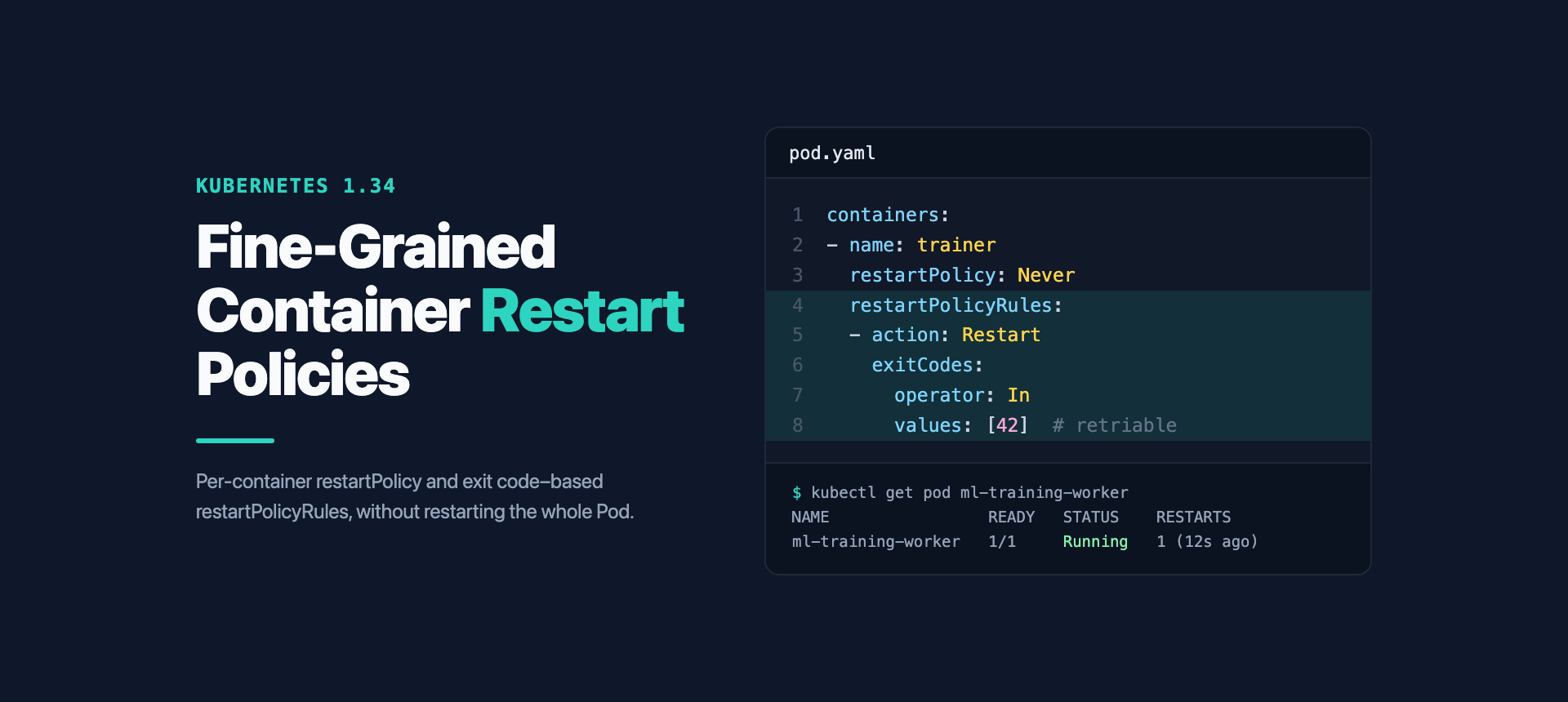
Every Kubernetes user has faced the difficulty of managing Pods with multiple containers. Modern Pods often have a main application container, a sidecar container for extra tasks (like monitoring or managing secrets), and an init container for a one-time initial process. However, all these containers were tied to the same restart rule for the whole Pod, which was often frustrating.
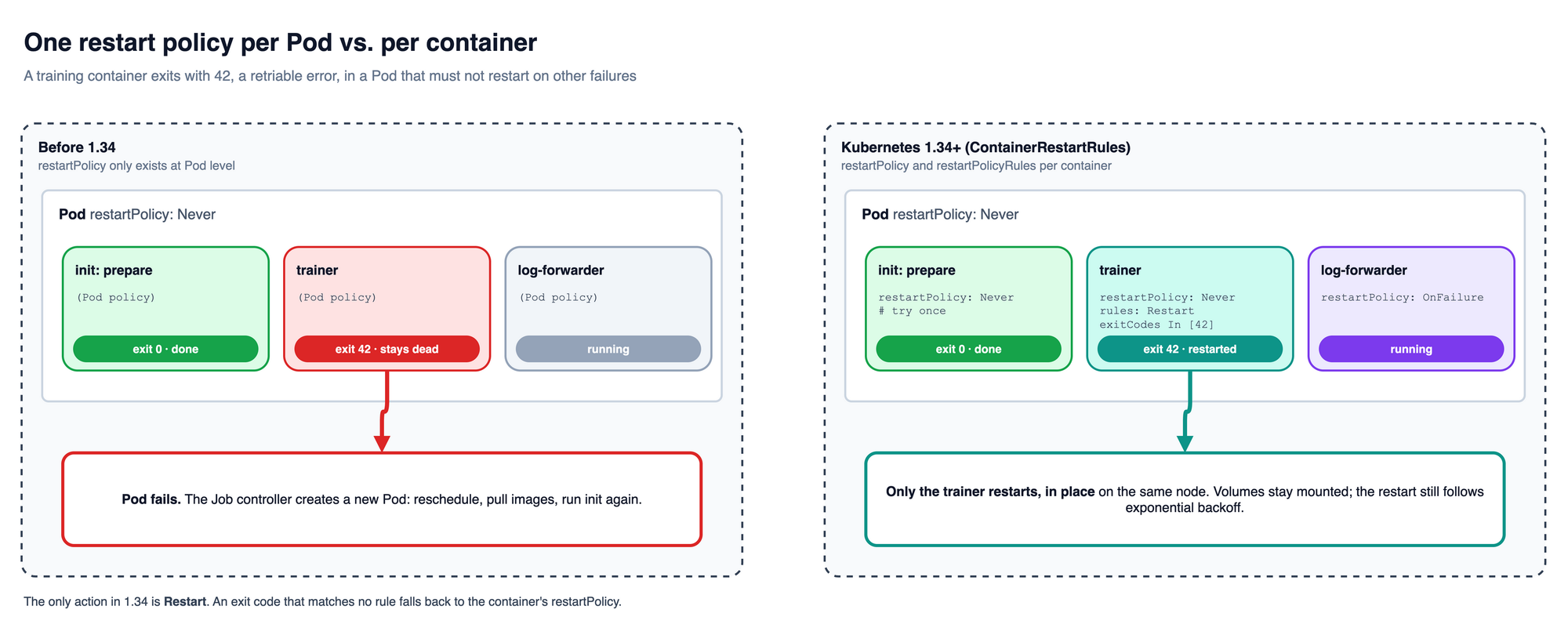
The kubelet has always restarted a failed container in place, but it applied one restartPolicy to every container in the Pod. A Pod with restartPolicy: Never could not retry a single container on a temporary error, and a Pod with Always could not run an init container just once. Kubernetes 1.34 introduces per-container restart policies and exit code rules, allowing for smarter control and faster recovery. This article will show how it works and why it's important.
Kubernetes 1.34: Better Restart Control
With the release of Kubernetes 1.34, the way container lifecycles are managed changes completely. The new feature, called Container Restart Policy and Rules, is still in the early (alpha) stage and allows restart control at the container level, no longer just at the Pod level. This is a big change that is more aligned with modern architecture.
This feature has two main parts:
- Per-Container Rules: Each app container and regular init container can now have its own
restartPolicythat overrides the Pod's rule. This allows each container within the same Pod to have different restart behaviors. - Exit Code-Based Rules: The new
restartPolicyRulesfield lets a container restart only when it exits with specific exit codes, providing a smarter way to handle problems.
ContainerRestartRules feature gate on the kube-apiserver and on every kubelet.The following table highlights the differences:
| Category | Pod restartPolicy (Before K8s 1.34) | Container restartPolicy (Starting K8s 1.34, Alpha) |
|---|---|---|
| Scope | Whole Pod. One rule for all app and regular init containers. Only native sidecars could set restartPolicy: Always on themselves. | Each container can have its own rule. |
| Available Rules | Always, OnFailure, Never. | Always, OnFailure, Never at the container level, plus exit code-based rules. |
| Problem Handling | No control based on exit codes. Only based on a failed status (OnFailure) or every time it stops (Always). | restartPolicyRules allow restarts based on specific exit codes. |
| Flexibility | Low. Requires complex solutions for Pods with many containers. | High. Allows for a cleaner Pod design. |
How to Use These New Rules
To use this feature, add restartPolicy and restartPolicyRules to entries under containers and initContainers in the Pod's configuration file.
Technically, restartPolicyRules is a list of rules. Each rule has two parts:
- action: The action to take when the rule matches. In Kubernetes 1.34 the only supported action is
Restart, which restarts the container in place. - exitCodes: The condition that triggers this action: an
operator(InorNotIn) andvalues(a list of up to 255 exit codes).
The kubelet evaluates the rules in order and applies the first one that matches. If no rule matches, it falls back to the container's restartPolicy. That is why the container restartPolicy must be set whenever you set restartPolicyRules, and why "do not restart on this code" is expressed with restartPolicy: Never rather than with a rule.
This system works best when your application is designed to output clear exit codes for different types of failures.
restartPolicyRules feature.Real-World Examples
This feature opens the door to more resilient and intelligent Pod designs. Here are a few examples:
Database Migration and Web Service
- Old Problem: With the Pod's
restartPolicy: Always, a failing database migration init container was retried again and again, so a migration that is not idempotent ran several times and the Pod sat inInit:CrashLoopBackOff. - New Solution: You can set
restartPolicy: Neverfor the init container. - Result: The migration runs once. If it fails, the Pod fails instead of retrying, and the main application never starts against a half-migrated database. The main service container keeps
restartPolicy: Alwaysfor normal operation.
apiVersion: v1
kind: Pod
metadata:
  name: app-with-migration
  labels:
    app: user-service
    version: v1.0.0
spec:
  # Pod-level restartPolicy is optional (default Always); container-level policies override it.
  restartPolicy: Always
  initContainers:
  - name: db-migrator
    image: my-company/db-migration:1.0.0
    restartPolicy: Never # A single, one-time run. If it fails, the whole Pod fails.
    env:
    - name: DB_HOST
      valueFrom:
        secretKeyRef:
          name: db-credentials
          key: host
    command: ["/migrate", "--target-version=v1.0.0"]
  containers:
  - name: user-service
    image: my-company/web-app:1.0.0
    restartPolicy: Always # This service should always be running.
    ports:
    - containerPort: 8080
    livenessProbe:
      httpGet:
        path: /health
        port: 8080
      initialDelaySeconds: 30
This works as described for a bare Pod. Under a Deployment, the ReplicaSet replaces a failed Pod with a new one, so the migration would run again in the new Pod. Run one-time migrations as a Job when that matters.
Smart Recovery for AI/ML
- Old Problem: For long-running AI/ML jobs, restarting the entire Pod is very expensive in terms of time and resources.
- New Solution: You can configure a container to restart only for specific, fixable errors, such as a memory issue or network problem.
- Result: The Pod can recover from temporary, retriable failures without the need to reschedule the entire job. Fatal errors like data corruption match no rule, so the container falls back to
restartPolicy: Neverand the Pod fails.
apiVersion: v1
kind: Pod
metadata:
  name: ml-training-worker
  labels:
    job: nlp-classification
    role: worker
spec:
  restartPolicy: Never # Pod as a whole should not restart on failure
  containers:
  - name: training-worker
    image: ml-platform.io/trainer:v1.0.0
    restartPolicy: Never # Required when restartPolicyRules is set; applies when no rule matches
    restartPolicyRules:
    - action: Restart
      exitCodes:
        operator: In
        values: [42, 43] # 42: CUDA out of memory, 43: network timeout during gradient sync
    # Exit 1 or 2 (data corruption, invalid hyperparameters) matches no rule,
    # so the container is not restarted and the Pod fails.
    # ...
Microservice with Observability Stack
- Old Problem: Production microservices often bundle the core application with containers for logging and monitoring. All of them shared one Pod-level policy, so you could not keep the API always running while letting a helper container stop after a clean exit or after a fatal configuration error.
- New Solution: Each container in the Pod can have its own
restartPolicy. For example, the main application can be set toAlways, while the metrics exporter usesOnFailure. - Result: The core application stays highly available while the helper containers get a different restart behavior, and exit codes can separate a retriable Elasticsearch connection problem from a configuration error that a restart will not fix.
apiVersion: v1
kind: Pod
metadata:
  name: payment-service-stack
  labels:
    app: payment-api
spec:
  restartPolicy: Never
  containers:
  - name: payment-api
    image: payments.io/api-server:v1.2.3
    ports:
    - containerPort: 9000
    restartPolicy: Always
    # ...
  - name: prometheus-exporter
    image: prom/node-exporter:v1.3.1
    ports:
    - containerPort: 9100
    restartPolicy: OnFailure
    # ...
  - name: log-forwarder
    image: fluent/fluent-bit:1.9.3
    restartPolicy: Never # Applies to any exit code not listed below
    restartPolicyRules:
    - action: Restart
      exitCodes:
        operator: In
        values: [1, 2] # Elasticsearch connection issues
    # A configuration syntax error exits with a different code, matches no rule,
    # and leaves the forwarder stopped until the config is fixed.
    # ...
If the log forwarder must start before the application and run for the Pod's whole life, define it as a native sidecar instead: an entry under initContainers with restartPolicy: Always. A sidecar always restarts, so restartPolicyRules has no effect on it.
Exit Code Design Patterns
This table provides an example of suggested exit code patterns and corresponding restart actions:
| Error Type | Example Exit Codes | Description & Context | Recommended restartPolicyRules |
|---|---|---|---|
| Configuration | 1, 2, 3 | Incorrect configuration, missing variables. Fatal, cannot be fixed by restarting. | No rule. With restartPolicy: Never the container stays stopped, because the Pod will never succeed. |
| Resources | 10, 11, 12 | Resource errors the application detects and reports itself, such as a CUDA out-of-memory error or a full scratch disk. Can be retried. | Restart, because a restart can resolve this temporary issue. |
| Network | 20, 21, 22 | Connection timed out, DNS failed. Often temporary and can be retried. | Restart, so the container can recover its connection without needing to reschedule the Pod. |
| Application | 30, 31, 32 | Logic error, data validation failed. Depends on the application; can be fatal or not. | Depends on the application's design. |
| Killed by a signal | 137, 143 (128 + signal) | Set by the container runtime, not by your code: 137 is SIGKILL, including an OOM kill by the kernel; 143 is SIGTERM. | Usually no rule. An OOM kill repeats on restart unless the memory limit changes. |
Keep application exit codes between 1 and 124. Shells and container runtimes reserve 125 to 127, and codes above 128 report a signal.
For informed restart decisions, applications should exit with codes that accurately reflect the cause of failure.
Benefits & Efficiency
This feature is not just a small fix, but a big step forward in operational efficiency.
More Efficient
The biggest benefit is better efficiency. When a container fails with a retriable exit code, the kubelet restarts it in place on the same node. The Pod is not deleted, rescheduled or re-initialized, so you skip the scheduling, image pulls, volume attachment and init containers that a replacement Pod needs.
The restart itself still follows the normal exponential back-off: 10 seconds after the first failure, doubling up to a 5-minute cap. A container that keeps exiting with a "retriable" code ends up in CrashLoopBackOff like any other.
Preserve Data and Simpler Architecture
In-place restarts keep the Pod's volumes and network configuration intact, including emptyDir data and the Pod IP. Only the restarted container's own writable filesystem starts fresh. The feature also simplifies the architecture by removing the need to split functionality into different Pods.
Operational Considerations
Although the Container Restart Policy and Rules feature is very useful, you should use it carefully because it is still in the alpha stage.
ContainerRestartRules graduated to beta and is enabled by default.Strategies for Migrating Existing Workloads
Follow these four steps when adopting the new feature:
- Analyze: Check your current Pod restart patterns. Find the containers that often have problems and would benefit from these new rules.
- Testing: Turn on the
ContainerRestartRulesfeature gate on the API server and kubelets of your development cluster. Test existing applications to make sure there are no issues. - Gradual Migration: Start using this feature on new or less critical applications. Avoid moving mission-critical production applications until the feature is stable.
- Improve Monitoring: Update your monitoring tools to track restarts at the container level, not just the Pod level.
Debugging Complexity
With more control, debugging becomes more complex. You need to check container logs and container-level restart metrics to understand why a container is restarting or not.
# Restart count and last exit code per container
kubectl get pod my-pod -o jsonpath='{range .status.containerStatuses[*]}{.name}{"\t"}{.restartCount}{"\t"}{.lastState.terminated.exitCode}{"\n"}{end}'

# The same for init containers
kubectl get pod my-pod -o jsonpath='{range .status.initContainerStatuses[*]}{.name}{"\t"}{.restartCount}{"\t"}{.state.terminated.exitCode}{"\n"}{end}'

# Last termination reason and exit code, as kubectl describe shows them
kubectl describe pod my-pod | grep -E 'Last State|Reason|Exit Code|Restart Count'

# Logs of the previous run of a restarted container
kubectl logs my-pod -c training-worker --previous
Resource Planning
Restart policies also change how we think about capacity. A container that restarts in place keeps the Pod on its node, so the Pod's resource requests stay reserved during the back-off. A Pod that fails releases them and its replacement is scheduled again.
Monitoring & Alerting
When using container-level restart policies, monitoring becomes more important. kube-state-metrics already exposes restarts per container:
# Containers that restarted more than 3 times in 15 minutes
sum by (namespace, pod, container) (increase(kube_pod_container_status_restarts_total[15m])) > 3

# Why a container last terminated (Error, OOMKilled, Completed, ...)
kube_pod_container_status_last_terminated_reason == 1
Keep an eye on how often each container restarts, not just the Pod. Set up alerts for cases where a container fails to restart as planned, or keeps restarting when it shouldn't.
Implementation Recommendations
- Keep it Simple First: Start with basic per-container rules, then add exit code logic as needed.
- Plan Exit Codes: Design your app to return meaningful exit codes that show what kind of error happened.
- Monitor Thoroughly: Observe restart trends at both Pod and container levels to detect unexpected behavior.
- Document Clearly: Provide clear documentation of restart logic so operational teams can troubleshoot without confusion.
Conclusion
Kubernetes Container Restart Policy and Rules advance container management by offering granular control over Pods. This feature addresses long-standing design issues, enabling more resilient and efficient applications. Managing individual container lifecycles and smart recovery logic based on exit codes reduces recovery time, saves resources, and simplifies Pod architecture.
However, it's important to note that this only controls restart behavior; the readiness rule of the Pod does not change. A Pod is Ready only when all of its containers are ready. For example, if a sidecar crashes while the main application container is still running, direct communication to the main container (e.g., via Pod IP) still works, but access through a Service is affected because the Pod is marked as not ready and removed from the Service's endpoints.
FAQ
What is the new Container Restart Policy in Kubernetes 1.34?
Starting with Kubernetes 1.34, you can define restart policies at the container level, not just for the entire Pod. App containers and regular init containers can each have their own restart behavior.
How do exit code-based restart rules work?
The restartPolicyRules field restarts a container when its exit code matches a rule. With restartPolicy: Never and a rule for exit code 42, the container restarts when your application exits with 42 (for example, on a CUDA out-of-memory error it detected) and stays stopped on any other code, such as 1 for a configuration error.
What are some real-world use cases?
- Database migration init container: fail the Pod if the migration fails, instead of retrying endlessly.
- AI/ML jobs: retry only on fixable errors (e.g., CUDA out-of-memory) and stop on fatal ones.
- Helper containers: apply different restart policies to logging or monitoring containers without affecting the main app.
How can I enable and use this feature?
On Kubernetes 1.34, a cluster administrator must enable the ContainerRestartRules feature gate on the API server and kubelets. From 1.35 it is enabled by default. Then define restartPolicy and restartPolicyRules under each container or init container in your Pod manifest.
Are there any limitations I should be aware of?
- The feature is alpha in 1.34, so avoid it in mission-critical production environments.
Restartis the only action; anything else falls back to the container'srestartPolicy.- Rules have no effect on native sidecars, and ephemeral containers do not accept them.
- Pod readiness logic does not change: a Pod is only Ready if all its containers are ready.
- Debugging can be more complex, since you need to check container-level logs and restart metrics.
Reference
- Kubernetes v1.34: Finer-Grained Control Over Container Restarts | Kubernetes
- Pod Lifecycle: Individual container restart policy and rules | Kubernetes
- KEP-5307: Container Restart Policy | kubernetes/enhancements
Originally published on the kloia blog.


